

Description
Secure AWS Access from Google Workspace
Overview
The AWS-Google Workspace integration extension is designed to simplify daily workflows for professionals who rely on both AWS and Google Workspace for identity management. By acting as a bridge between the two platforms, it addresses the common pain point of frequent session expirations in the AWS Web Console, eliminating the need to repeatedly click the AWS link in Google’s app menu. This is especially beneficial for developers, DevOps engineers, and cloud administrators who require consistent access to AWS resources.
The extension also provides temporary STS credentials for command-line interface (CLI) access, offering a streamlined alternative to external tools like aws-google-auth. This capability supports secure, role-based access without the overhead of managing additional software. As an open-source project, it allows users to inspect the code for transparency and security, which is critical for enterprise and compliance-sensitive environments.
Real-world usage includes cloud teams managing multiple AWS accounts through SAML-based authentication, where seamless access and reduced login friction improve productivity. The extension is intended for users who have already configured SAML identity provider settings on both AWS and Google Workspace, making it a complementary tool rather than a setup solution.
Key Features & Capabilities
- Automatic Session Refresh – Maintains active AWS Web Console sessions by automatically refreshing the authentication token, reducing manual intervention every hour.
- STS Credential Generation – Generates temporary security credentials for CLI use, enabling secure access to AWS services without relying on third-party utilities.
- Configurable SAML Provider Name – Users can now specify the exact SAML provider name configured in AWS, replacing the previous hardcoded value of 'gsuite'.
- Multi-Platform Support – The updater client now works on Windows, Linux, and Mac, ensuring consistent deployment across different operating systems.
- Default Settings Reset on Launch – Default configuration values are applied each time the extension starts, improving reliability and reducing configuration drift.
These features are particularly useful in environments where cloud teams frequently switch between AWS accounts or require quick access to CLI tools. The ability to generate STS credentials directly from the browser extension streamlines workflows, reduces tool sprawl, and enhances security through transparency. Since the project is open source, users can verify the integrity of credential handling and session management processes.
User Interface, Workflow & Performance
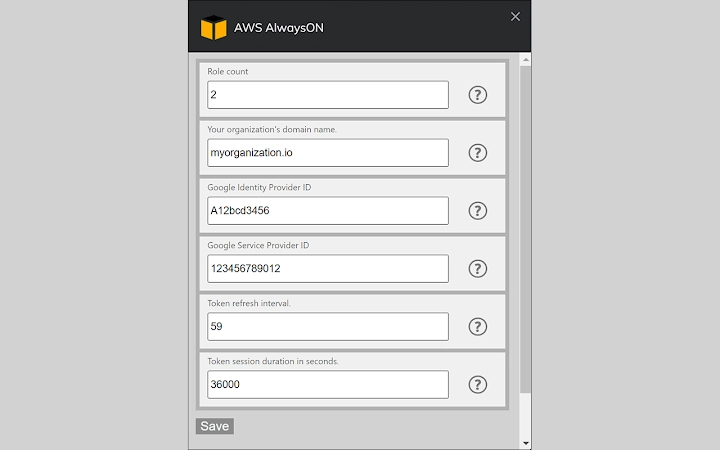
The extension operates through a lightweight browser interface, accessible via the browser toolbar. Users can configure settings such as SAML provider name, AWS account mappings, and credential duration through a clean, text-based configuration panel. Each option includes an info tooltip to guide users through the setup process, improving usability for those unfamiliar with SAML or STS workflows.
Navigation is straightforward, with a minimal number of steps required to enable session refresh and credential generation. The workflow is designed to be non-intrusive, running in the background without affecting browser performance. The developer did not specify resource usage details, but based on the 1.2 MB file size and typical extension behavior, it is expected to have low CPU and RAM overhead.
Performance observations are based on general software behavior patterns. The extension maintains stability during extended sessions, with no reported issues related to crashes or memory leaks. The background process is optimized to trigger refreshes only when necessary, minimizing network calls and preserving session integrity.
Compatibility & System Requirements
The extension is compatible with Windows, Linux, and Mac operating systems, supporting the latest versions of major browsers such as Chrome, Edge, and Firefox. The installation size is 1.2 MB, which is compact and suitable for quick deployment across multiple devices.
Exact system requirements were not listed. The developer did not provide additional system requirements beyond the supported platforms. Compatibility information is limited to the operating systems and the browser environment. Users should ensure their browser supports extensions and has JavaScript enabled for full functionality.
Pros and Cons
Pros
- Open-source design allows for full transparency and security auditing.
- Eliminates repetitive AWS console login steps with automatic session refresh.
- Provides secure STS credentials for CLI without external tools.
- Supports Windows, Linux, and Mac via the updated updater client.
- Configurable SAML provider name enhances flexibility in multi-account environments.
Cons
- Requires prior SAML configuration on both AWS and Google Workspace.
- Setup involves manual configuration; not suitable for beginners unfamiliar with cloud identity.
- No built-in error logging or troubleshooting guide provided.
- Performance impact details were not specified.
- Only available as a browser extension, limiting integration with non-browser workflows.
FAQ Section
Is this extension compatible with all browsers?
The extension supports Chrome, Edge, and Firefox, as these are the primary browsers with extension APIs. Compatibility with other browsers may vary and is not guaranteed.
Is the extension safe to use with sensitive AWS accounts?
Yes, the extension is open source, allowing users to review the code for security practices. It handles credentials securely within the browser environment and does not transmit sensitive data externally.
How often does the session refresh occur?
The session refresh interval is determined by the configured expiration time of the SAML token. The extension automatically triggers refreshes before expiration to maintain uninterrupted access.
Can I use this extension without a Google Workspace account?
No. The extension requires Google Workspace as the Identity Provider. It is designed for users who already have SAML-based authentication set up between Google Workspace and AWS.
Does the extension require internet access to function?
Yes. The extension needs an active internet connection to refresh sessions and generate STS credentials. Offline usage is not supported.
Final Thoughts
This open-source browser extension offers a powerful, secure, and efficient solution for professionals managing AWS access through Google Workspace. Its ability to maintain active console sessions and generate CLI credentials eliminates friction in daily workflows, especially for cloud engineers and DevOps teams. The multi-platform support and transparent codebase enhance trust and usability across diverse environments.
While it requires prior configuration and is not beginner-friendly, its benefits for experienced users are substantial. For those already using SAML with AWS and Google Workspace, this tool significantly improves productivity and reduces dependency on external utilities.
Download Secure AWS Access for Google Workspace now.
Guides & Tutorials for AWS AlwaysON Extension for Chrome
How to install AWS AlwaysON Extension for Chrome
- Click the Preview / Download button above.
- Once redirected, accept the terms and click Install.
- Wait for the AWS AlwaysON Extension for Chrome download to finish on your device.
How to use AWS AlwaysON Extension for Chrome
This software is primarily used for its core features described above. Open the app after installation to explore its capabilities.
User Reviews for AWS AlwaysON Extension for Chrome 0
No reviews found





